

Don’t get attached to a specific tool. Tools come and go, evolve, and get replaced – but the underlying technology remains. Whether it’s Docker or Podman doesn’t really matter. What matters is understanding what’s happening underneath: how Linux works, what a container actually is, and how isolation is achieved at the system level. In my opinion, the best way to approach learning is from the bottom up. When you do that, the abstractions disappear and any tool becomes easy to use because you understand what it’s doing behind the scenes.
Lets build a mini version of docker on linux with Go and you’ll understand what a “Docker container” really is and the philosophy behind systems like Kubernetes Pods.
Senior engineers should understand the systems they rely on — not just the commands that operate them.
A Different Approach: Bottom-Up Learning #
For this article, I decided to flip the process:
Start from the lowest level possible — and build up.
Instead of starting with Docker, ask yourself:
- what is a container really?
- what does Linux provide out of the box?
- how far can I go with just syscalls and processes?
Prerequisites 🐧 #
You’ll need to run everything on Linux. Mac won’t work. Spin up a Linux VM on top of you MacOS or get an old laptop of yours and install Fedora Server or any other Linux flavor you prefer – up to you.
Once you have your Linux running, install Go. Guide: here
fork() & exec() in linux #
fork() creates a new process. exec() transforms a process into something else. Containers rely on exec because the first process inside the container must become the actual application.
Let’s see what happens when you run a command in your bash shell by invoking the command directly like
lsWhat pannes is, bash copies itself and the copy of the bash process becomes a new program (exec) and when ls executes it terminates itself and it returns bask to the bash shell.
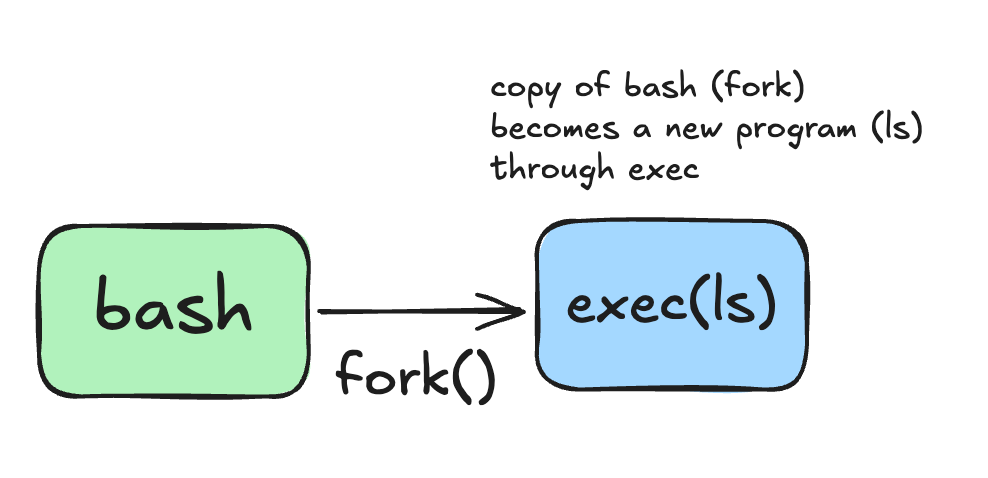
Try something else. On you bash shell, run:
exec lsYou will see that ls will become the new program, it will execute itself, give the results of the command and then, the terminal will disappear. Why? Because you explicitelly made ls the current execution program and it doesn’t have the same functionalities as you bash shall programm which gives you an open terminal window to keep executing one command after another. So once its done executing, it will dissapear.
So again, what happens when you just run the ls command from you bash shell?
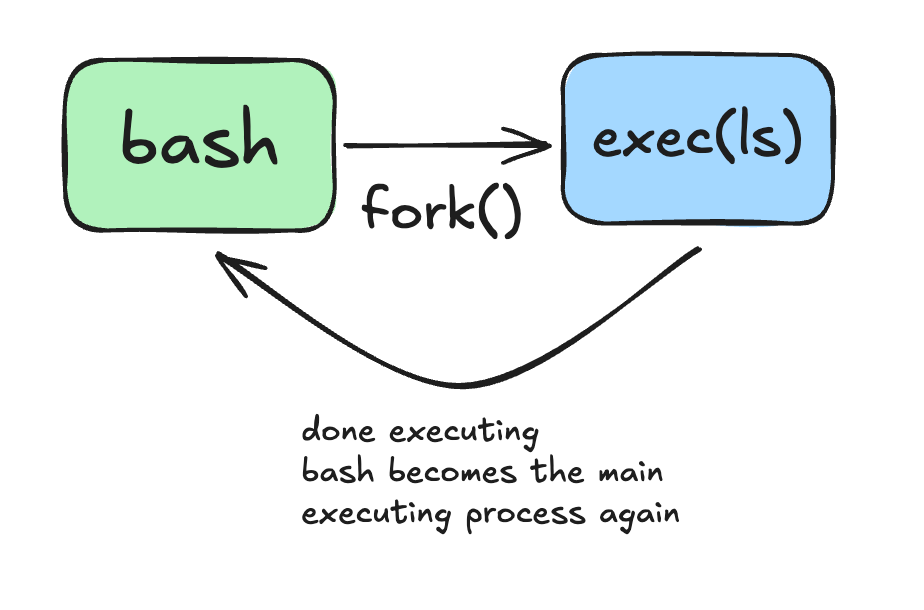
Why do we need that? Keep it and you will understand later.
Container anatomy #
First of all, lets understand that there is no kernel in the container technology.
Unlike real VMs that have their own kernel and user space, containers use the host’s kernel as processes which are isolated and this is achieved by core linux features like namespaces, cgroups and some more.
This is how a VM works:
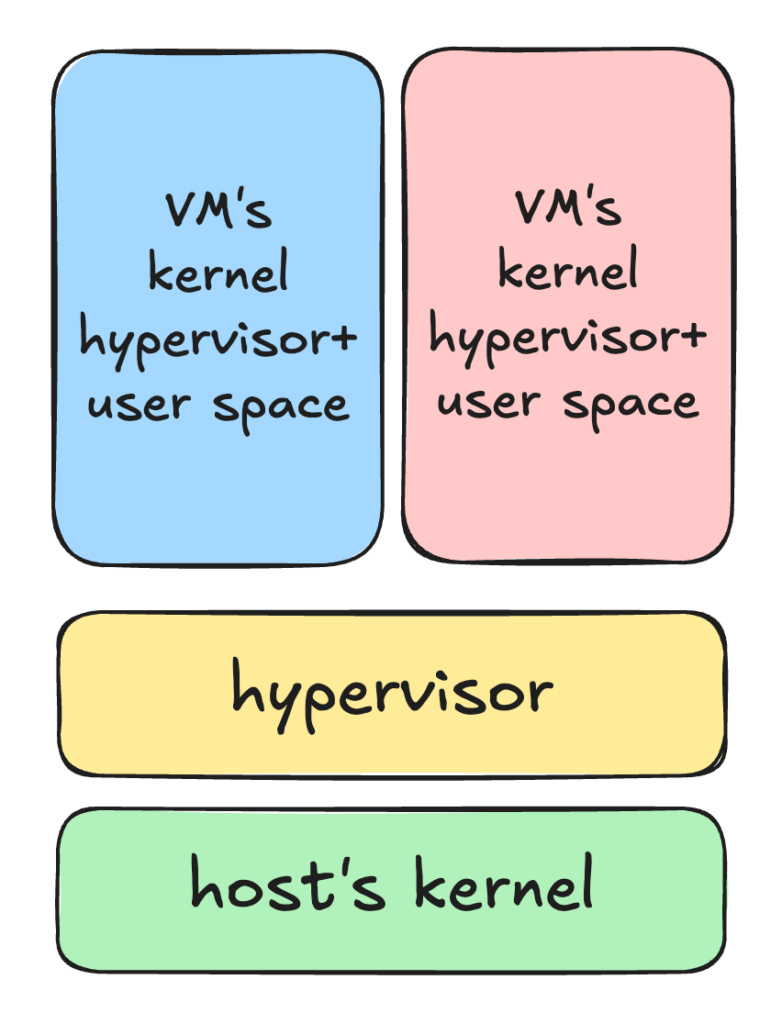
VMs become very heavy because of this architecture and next we will take a look at the container’s anatomy and understand why it is so easy and efficient to use.
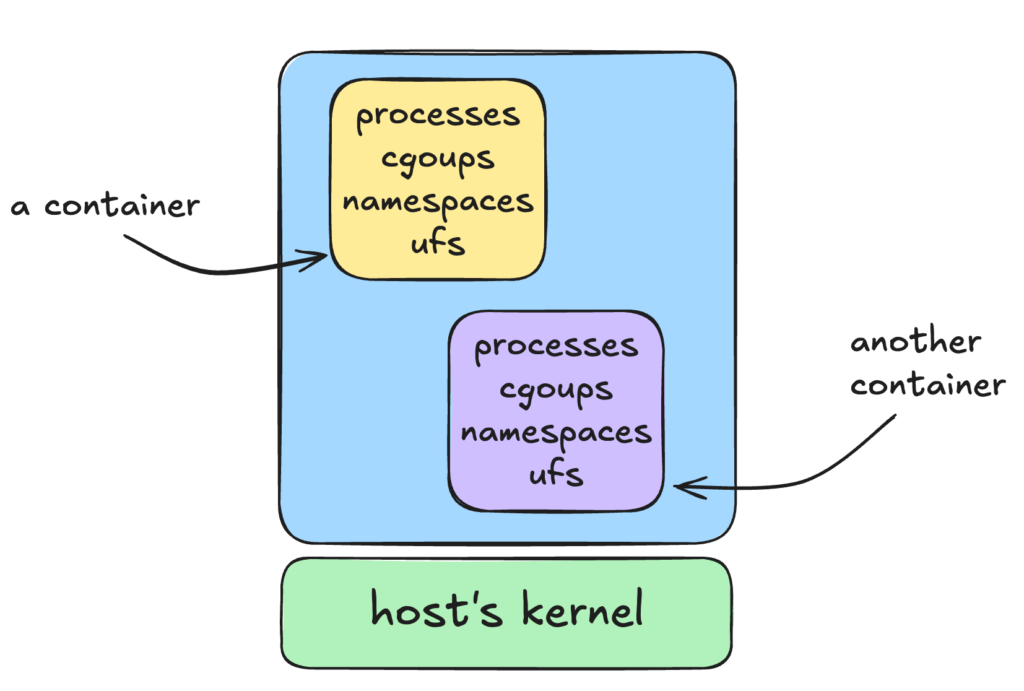
So you can see that a container is one or more processes which are isolated from the host and from one another. With linux namespaces you control what those processes can see and with cgroups you can control what are those processes going to use.
Some of the namespaces a container uses:
pid: so the container has it’s own tree of PID’s and the first processes running inside the container takes the PID 1. Inside the container there is no access to the processes running on the host. Of course the host can see this process and for the host this is not the PID 1 process.
mnt: so container has it’s own isolated file system.
uts: so the container has it’s own hostname.
With cgroups we can control the resources assigned to the container. Some of the resources ew control are:
- CPU
- Memry
- Block I/O
If processes inside the container try to exceed limits, they are throttled or killed.
And by the way, when you are using a base image to build a docker container and this image is an ubuntu version, it’s not true. This is jsut an ilusion. There is no real kernel in the container, only the same commands and file system you find in a particular linux flavor, but in the end they are translated to execute everythingon your host’s OS.
Bonus: Kubernetes Pods are also nothing more than kubernetes managed containers which group other containers inside them.
Our first container #
Okay now lets create our mini container runtime environment, i called it minibox.
We will asume our minibox has only one command and it dows only one thing. Running a linux program inside a container.
package main

import "fmt"
import "os"


func main() {

  switch os.Args[1] {
  case "run":
	  container.Run(os.Args[2:])
  default:
	  fmt.Println("Unknown command:", os.Args[1])
  }
}

func Run(cmdArgs []string) {

        //spawn a new process
	cmd := exec.Command(cmdArgs[0], cmdArgs[1:]...)

        //attach stdin/stdout
	cmd.Stdin = os.Stdin
	cmd.Stdout = os.Stdout
	cmd.Stderr = os.Stderr

	fmt.Println("Running command:", cmdArgs)

	err := cmd.Run()
	if err != nil {
		fmt.Println("Error:", err)
		os.Exit(1)
	}

}
run the go program
go build -o minibox main.go
./minibox run bash
Your Go program is the parent process and it spawns a new process, in this case, bash. We are also attaching the new process terminal so we can “exec” into the new container.
Now that you connected the terminal to it, try to run:
ps -aux

hostname
You will notice that you can see a bunch of processes and not only the bash process that we just spawned from our Go program. And the hostname is just the host’s hostname. Which makes sense.
Namespaces #
This is where namespaces come into play.
package main

import (
	"fmt"
	"os"
	"os/exec"
	"syscall"
)

func main() {

	switch os.Args[1] {
	case "run":
		Run(os.Args[2:])
	default:
		fmt.Println("Unknown command:", os.Args[1])
	}
}

func Run(cmdArgs []string) {

	//spawn a new process
	cmd := exec.Command(cmdArgs[0], cmdArgs[1:]...)

	//attach stdin/stdout
	cmd.Stdin = os.Stdin
	cmd.Stdout = os.Stdout
	cmd.Stderr = os.Stderr

	//create new namespaces to isolate system views
	cmd.SysProcAttr = &syscall.SysProcAttr{
		Cloneflags: syscall.CLONE_NEWUTS | // new hostname namespace
			syscall.CLONE_NEWPID | // new PID namespace
			syscall.CLONE_NEWNS, // new mount namespace - filesystem isolation
	}

	fmt.Println("Running command:", cmdArgs)

	err := cmd.Run()
	if err != nil {
		fmt.Println("Error:", err)
		os.Exit(1)
	}

}
Since we attached a new hostname, PID and mount namespace to the container process, we should only see couple of PID’s running in the spawned bash schell process, right? Wrong.


